Register your texting number
On the Book plan and up
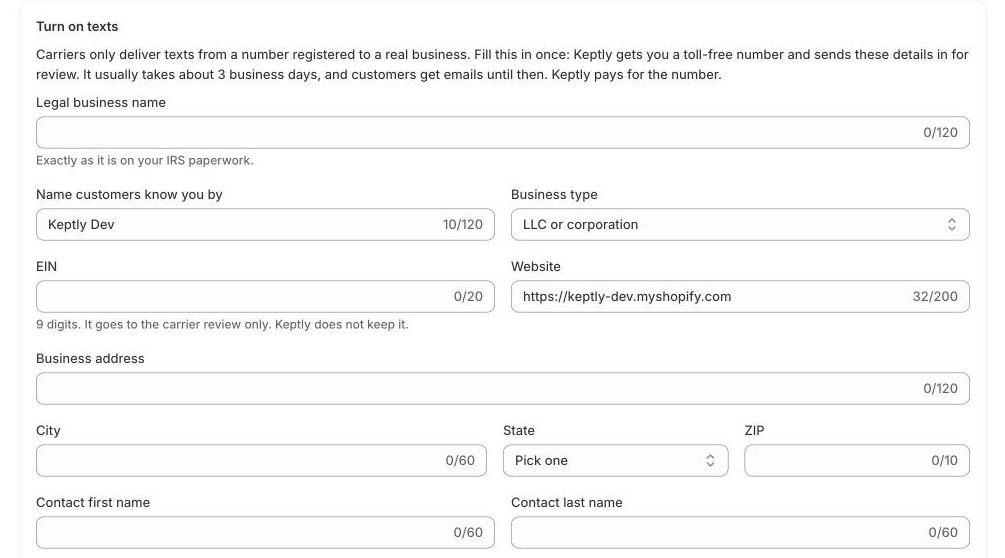
Carriers only deliver texts from a number registered to a real business. You fill in your details once, Keptly gets you a toll-free number and sends them in. Approval usually takes about 3 business days, and customers get emails until then.
- In Keptly, open Settings and click "Turn on texts" (or "Texts from your own business number" on the setup page or on Today's list for later).
- Fill in your business: the legal name as it reads on your tax papers, the name customers know you by, your business type, your EIN (only sole proprietors can skip it), your website and address, a contact person, and about how many texts a month.
- Tick the box to confirm you only text customers about bookings they made, and click "Send for review".
- The page shows "In review". Keptly checks for an answer every 20 minutes and turns texts on as soon as carriers approve.
Still stuck? Contact support or email hello@keptlyapp.com. A person replies within two hours, 8 am to 8 pm Central, every day of the week.